Tracking · 18 lines
Container Tracking
Paste a container number: we check the digit, name the company that owns the box, and send you to the right official tracker.

4 letters + 7 digits, printed on the doors. It is on your bill of lading too.
The answer appears as you type. Nothing is sent anywhere.
We don’t show live status — the carrier’s page is the authoritative source. We validate the number and route you there.
- 18 carrier trackers opened by hand to see what each accepts; direct links tried on 7 · How we tested them
No number to hand? Start from the line:MaerskMSCCMA CGMCOSCO Shipping LinesHapag-LloydONE18 lines in our prefix directory →
Holding a bill of lading or a booking reference instead?Find the line from its prefix →
If the first four letters belong to a leasing company, its own site has nothing to show you: a leased box is tracked with the line named on your booking or bill of lading.
To track a container, enter its 11-character number on the operating carrier’s own tracking page, which is free and needs no account. The number is four letters and seven digits in the format ISO 6346 sets (read in IS 6928:2001), for example MSKU 307703-8, and it breaks down like this: MSK is the owner’s BIC code, U marks a freight container, 307703 is the serial number and the final 8 is a check digit computed from the other ten characters. The first three letters tell you whose system to ask: MSKU is Maersk, MSCU is MSC, CMAU is CMA CGM, HLCU is Hapag-Lloyd. You will find the number stencilled on the right-hand container door, on the sides and roof, and printed on your bill of lading and booking confirmation. A working lookup returns the event chain — gate-in, load on vessel, transshipment, discharge, gate-out — plus the vessel’s position and the carrier’s ETA; treat any ETA more than a week out as an estimate.
The line carrying a container records each move it makes — gate, ship, port — and shows that record free of charge; the box itself reports nothing. You just need to know whose system to ask. The container number itself tells you.
The guide below covers everything the checker cannot do for you: how to read the number (step 1), who actually runs the box (step 2), where to track it line by line (step 3), what each status event means, and — the part nobody else explains — what to do when tracking shows nothing. Everything runs in your browser; your number never leaves your device.
What is container tracking?
Container tracking is the free lookup of a shipping container’s current status — terminal moves, vessel, position and estimated arrival — using the 11-character ISO 6346 number painted on the box, queried against the operating carrier’s public systems.
Here’s how the pipeline works. Terminals and vessels report events into the carrier’s system — gate-in, load, discharge — and the carrier republishes them on its tracking page. That has two consequences worth knowing before you start. First: the carrier’s own page is always the authoritative source; every aggregator resells its data. Second: events travel through EDI batches, not live feeds.
Terminal events reach public trackers in batches, often some hours after the move itself. A container that physically left the port this morning can legitimately still show “discharged” tonight — that is a feed delay, not a lost box.
Step 1: Read the container number
Find the number on the doors or either side wall: four letters, seven digits — e.g. MSKU 307703-8. The first three letters are the owner’s BIC code, the fourth is always U for freight containers, then a six-digit serial and a final check digit. The full format is defined by ISO 6346.
That last digit is arithmetic, not decoration. Each of the first ten characters converts to a value (letters map to 10–38, skipping multiples of 11), each value is doubled per position, the sum’s remainder mod 11 is the check digit (a remainder of 10 is written 0). One misread character almost always breaks the match — which is why a failed lookup usually means a typo, not a missing container. Two substitutions cause most of those typos, in both directions: the letter O read as the digit 0, and the letter I read as the digit 1. Because only one character is wrong, the arithmetic can usually point at which one.
To see whose box it is from the first four letters alone, without the whole number, the container prefix lookup lists every prefix we have checked with its owner and where its boxes are tracked.
The standards behind the marking — sizes from ISO 668, codes from ISO 6346 — are unpacked in our ISO container standards guide; every size/type code like 22G1 or 45G1 is decoded in the container glossary.
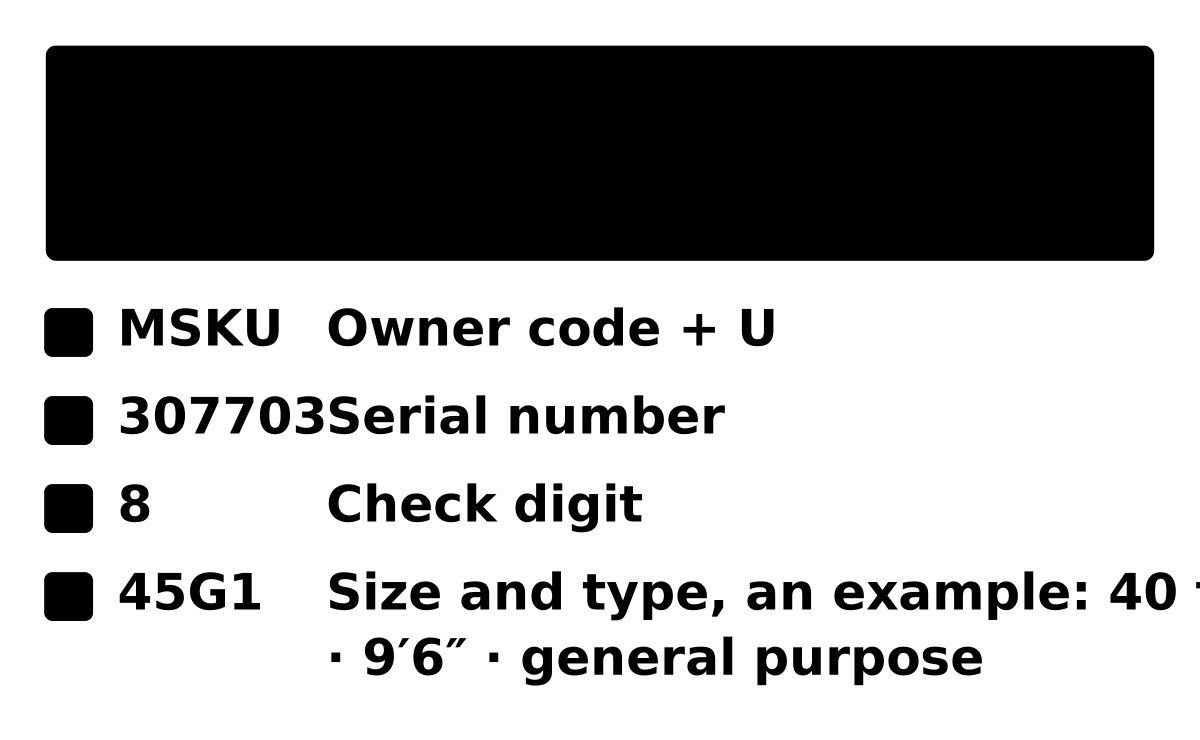
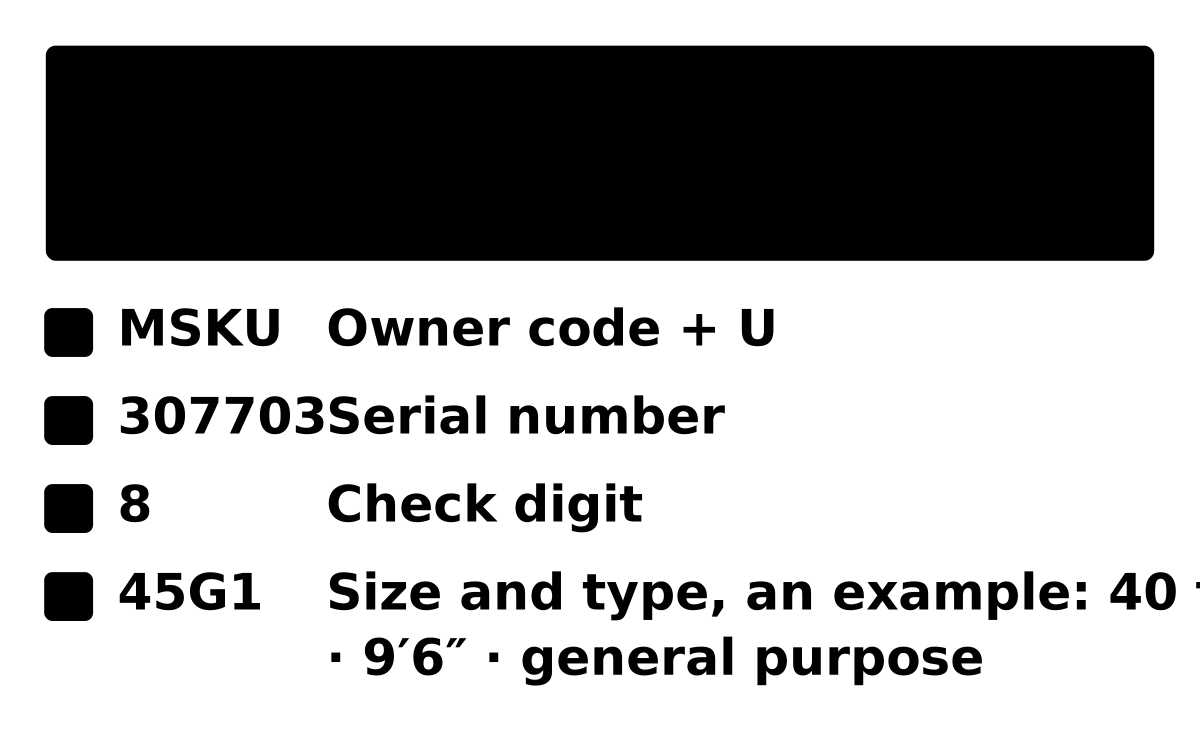
A container number is 11 characters in four parts. The size and type code is painted below it but is not part of the number.
- MSKOwner code3 letters
- Issued by the BIC, the worldwide register, and unique: MSK belongs to Maersk. It says whose box this is, not who is carrying it today.
- UEquipment category1 letter
- U is a freight container. J is detachable container-related equipment and Z is a trailer or chassis. In practice you will almost always see U.
- 307703Serial number6 digits
- Chosen by the owner and never repeated under its code. It carries no information about size or type.
- 8Check digit1 digit
- Computed from the ten characters before it. Mistype any single character and the digit no longer matches.
- 45G1Size and type code4 characters, separate
- 4 = 40 ft long, 5 = 9′6″ high (high cube), G1 = general purpose with passive vents. Not needed for tracking.
Where the 8 comes from
Each letter has a fixed value between 10 and 38 (11, 22 and 33 are skipped); digits are worth themselves. Each value is multiplied by a weight that doubles with every position.
| Character | M | S | K | U | 3 | 0 | 7 | 7 | 0 | 3 |
|---|---|---|---|---|---|---|---|---|---|---|
| Value | 24 | 30 | 21 | 32 | 3 | 0 | 7 | 7 | 0 | 3 |
| × Weight | 1 | 2 | 4 | 8 | 16 | 32 | 64 | 128 | 256 | 512 |
| = Product | 24 | 60 | 84 | 256 | 48 | 0 | 448 | 896 | 0 | 1,536 |
The products add up to 3,352. Divided by 11 that is 304 with 8 left over: the check digit is 8.
If the remainder is 10 the digit is 0. Owners usually avoid serial numbers that give that remainder.
Step 2: Identify who runs the box
Here’s the trap most tracking guides skip: the prefix names the owner, and the owner is not always the carrier. Roughly half of the world’s container fleet (47 % at the end of 2025, by the estimate in Triton’s annual report) belongs to leasing companies — Triton (TRLU, TCLU, TCKU…), Textainer (TGHU, TEMU, TGBU…), Florens, CAI — whose boxes are operated by whichever line booked the freight.
So a TRLU container may sail with Maersk today and MSC next quarter, and that is why searches like “Triton container tracking” lead nowhere: lessors run no trackers, because they never know which cargo is inside. The operating line is named on your booking confirmation or bill of lading — that is where you track. If you have neither document, the prefix alone cannot tell you: the same box carries different cargo for different lines through its working life.
Two attributions worth knowing because most prefix lists get them wrong: TCKU belongs to Triton, not Maersk, and TEMU belongs to Textainer, not Triton — both confirmed against the BIC register. And a TEMU-prefixed box has nothing to do with the Temu marketplace: parcels from the app are tracked with a courier number, not a container number.
Who owns which prefix
Every company in the register has a page of its own: each prefix it holds, the check digit worked through for one number under it, and where its boxes are tracked.
Shipping lines: Maersk (MAEU, MRKU, MSKU, PONU, SEAU, MNBU, MRSU, SUDU); MSC (MSCU, MEDU, MSDU, MSMU, MSNU, MSPU, MSYU, GTIU); CMA CGM (CMAU, CGMU, ECMU, APZU, APLU, APHU, CNCU); COSCO (CSNU, CBHU, CCLU, CSLU); OOCL (OOLU, OOCU); Hapag-Lloyd (HLCU, HLXU, HLBU, UACU, UAEU, HAMU); ONE (ONEU, MOAU, NYKU, KKFU, KKTU, KLFU); Evergreen (EGHU, EGSU, EISU, EMCU, EITU); HMM (HMMU, HDMU); Yang Ming (YMLU, YMMU); ZIM (ZIMU, ZCSU, ZMOU); Wan Hai (WHLU, WHSU); PIL (PCIU, PILU); SITC (SITU); KMTC (KMTU); Matson (MATU); Crowley (CMCU); SM Line (SMCU).
Leasing companies, whose boxes are tracked with the line that books them: Triton International (TRLU, TCLU, TCNU, TCKU, TTNU); Textainer (TGHU, TEXU, TEMU, TGBU, MAGU, SEGU, GESU); Florens (FCIU, FSCU); CAI (CAIU, BEAU, BMOU); SeaCube Containers (INBU); Touax (TGCU); CARU Containers (CARU); UES International (UESU); Blue Sky Intermodal (BSIU); Raffles Lease (RFCU).
Step 3: Track on the line’s official page
Most “container tracking” searches are really “where is my line’s tracker”. The table below answers that once: every prefix we have verified against the BIC register, line by line, with the official tracking page — and for each major line we keep a dedicated guide: Maersk, MSC, Hapag-Lloyd, OOCL and 14 more. All 85 owner prefixes we cover, held by 18 carriers and 10 leasing companies, are in the BIC register as we read it on 18 October 2026, each registered to its line or lessor or to a company of the same group (CBHU to Florens, COSCO’s leasing arm; NYKU to NYK Line and KKFU, KKTU and KLFU to K Line, two of ONE’s parents; EITU to Gaining Enterprise S.A., of the Evergreen group), and 15 are confirmed again by the company’s own document.
Not all trackers are equal, though. Some accept a deep link with your number already filled in; others ignore URL parameters entirely and want a paste. Of the 18 lines’ trackers we tested 7 in a real browser and published the result as a study with the raw data: 3 loaded the result directly, 4 loaded an empty form and ignored the number, and the other 11 we have not tested and do not claim either way.
Port terminal sites are the fastest source for the last mile: once the box is discharged, the terminal’s own container availability page shows customs holds and gate status hours before the line’s tracker updates.
Prefix list verified against the BIC register: 2026-10-18.
Data: BIC Container Prefix Register · ISO 6346 (1995 text, read in IS 6928:2001)
Check a list of container numbers
With a manifest rather than a single box, paste the whole list. Each number has its check digit verified, its owner named and the place to track it given — the line’s own tracker for a line-owned box, the line on your booking for a leased one. Up to 50 at a time, checked in your browser.
If a leasing company owns the box
Roughly half the world’s container fleet belongs to leasing companies rather than to shipping lines, so this is not an edge case — it is one of the most common answers a container number gives. Triton, Textainer, Florens, CAI and the rest own the steel and rent it out; they are not a party to your shipment, they never know what is inside, and they publish no tracking at all. Searching “Triton container tracking” leads nowhere for exactly that reason.
What you need is the operating line — whoever booked the freight for this voyage. It is named on your booking confirmation and on your bill of lading, and the same box can carry cargo for a different line next quarter, so the prefix alone will never tell you. If you hold a bill of lading but are not sure whose it is, its first four letters are the line’s SCAC code and name it on their own.
Once you have the line, the number tracks on that line’s own page exactly as a line-owned box would: the carrier reports events for every container it moves, owned or leased. These are the prefixes that work this way.
| Company | Prefixes |
|---|---|
| Triton International | TRLU TCLU TCNU TCKU TTNU |
| Textainer | TGHU TEXU TEMU TGBU MAGU SEGU GESU |
| Florens | FCIU FSCU |
| CAI (Mitsubishi HC Capital) | CAIU BEAU BMOU |
| SeaCube Containers | INBU |
| Touax | TGCU |
| CARU Containers | CARU |
| UES International | UESU |
| Blue Sky Intermodal | BSIU |
| Raffles Lease | RFCU |
Leased boxes are operated by whichever line booked the freight — track them on the operating line’s site, identified from your booking or B/L. Prefix list verified against the BIC register: 2026-10-18.
Data: BIC Container Prefix Register · ISO 6346 (1995 text, read in IS 6928:2001)
What the status events mean
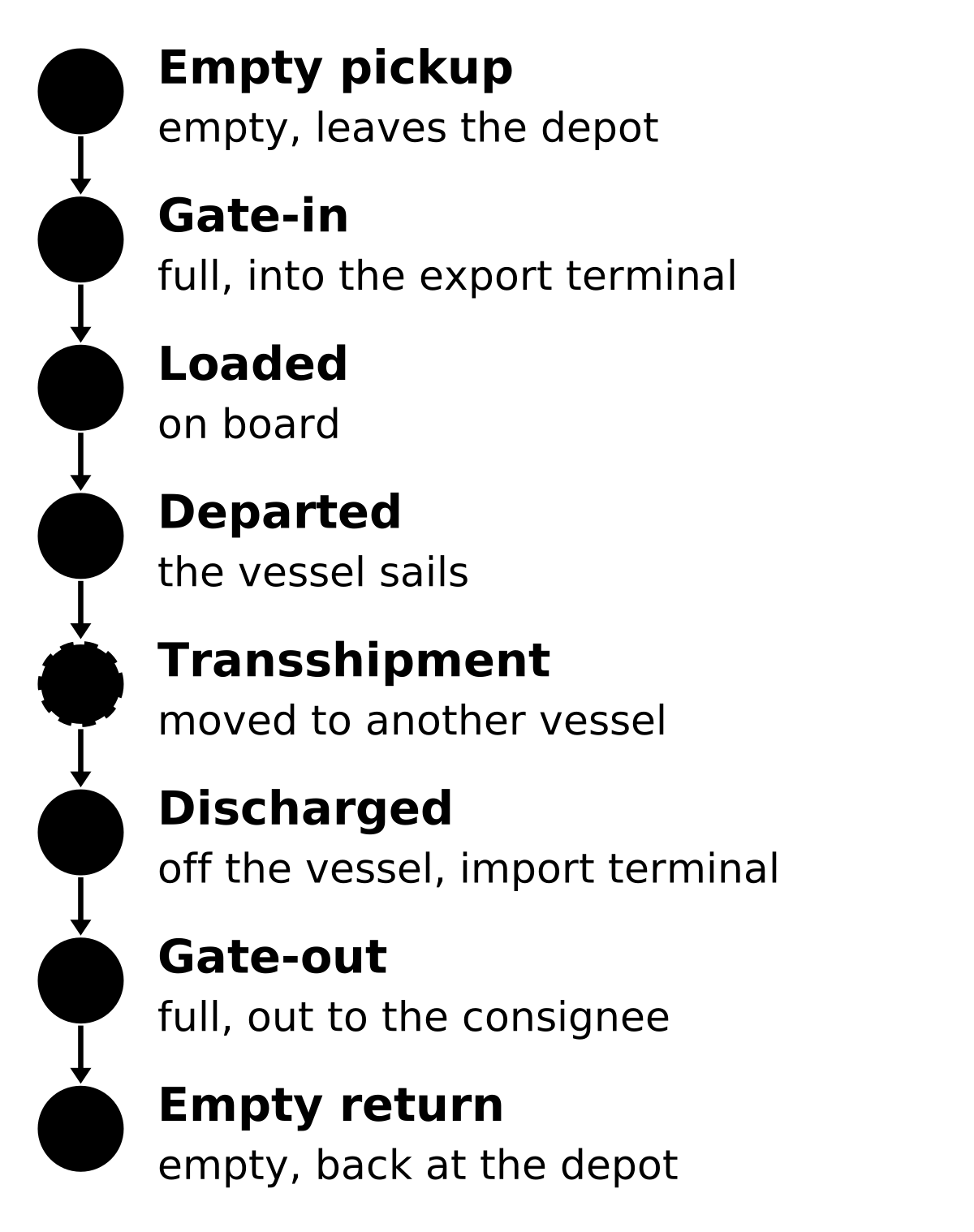
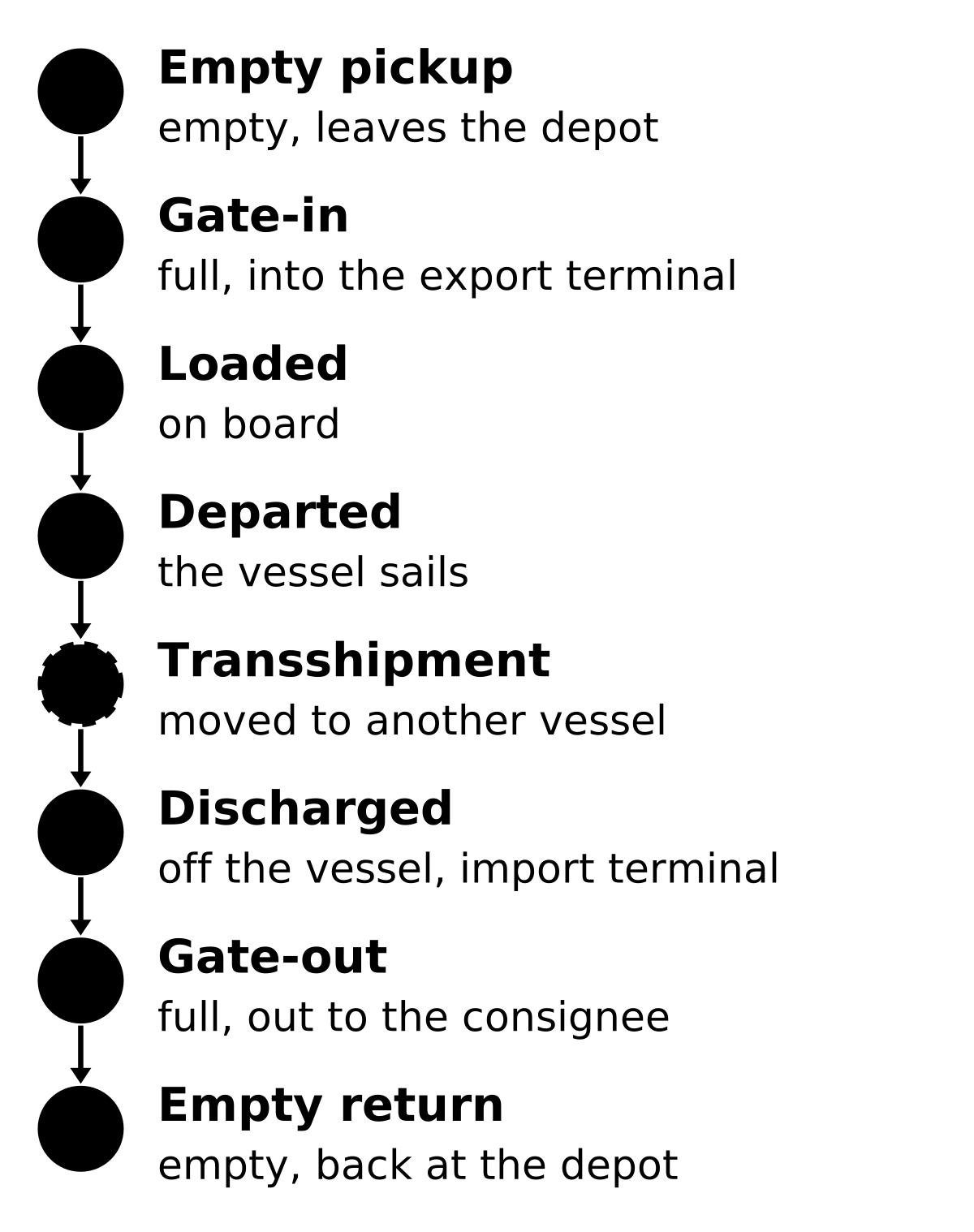
A working track returns a chain of standardized events. Read them once and every carrier’s tracker becomes legible — the wording shifts, the sequence doesn’t:
1. Empty pickup: the shipper collected the empty box from a depot — the trip officially starts here.
2. Gate-in: the loaded container entered the origin terminal; from this point it is in the carrier’s custody.
3. Loaded: craned onto the vessel — the event names the ship and voyage number.
4. Vessel departed: sailing confirmed; the ETA you see now is the carrier’s schedule, not a promise.
5. Transshipment: discharged and reloaded at an intermediate hub (Singapore, Rotterdam, Algeciras…) — only on routed sailings, and the most common place for delays.
6. Discharged: off the ship at destination; customs clearance usually starts here.
7. Gate-out: a truck took the box out of the terminal — and the free-time clock for returning it starts ticking — days inside the port are billed as demurrage, days outside it as detention.
8. Empty return: box handed back to the depot; the cycle is closed and tracking soon archives.
Between ports you also see the vessel’s AIS position. What you will not see: precise GPS of the box itself (only IoT-equipped premium containers have that), road positions after gate-out, and anything at all once the container leaves the ocean network.
After a transshipment, track by B/L number instead of container number — on some lines the container-level view lags behind the shipment-level view while the box waits at the hub. The event names themselves are not invented per carrier: most lines publish against the DCSA Track & Trace standard, which is why a gate-out means the same thing at Maersk and at Evergreen.
When tracking shows nothing: the five causes
The number validates, the carrier page loads — and returns nothing. This is where every other tracking site dead-ends, so let’s fix it properly. In order of likelihood:
1. The shipment is too new. Carriers publish the first event only after gate-in or loading, not when the booking is made. Booked yesterday means nothing to show yet — wait, don’t re-book.
2. The trip is over. Trackers archive shipments some time after delivery, and how long varies by line; an old number from documents resolves to nothing even though it was once valid.
3. The prefix belongs to a lessor. TRLU, TGHU and friends — see step 2; track with the operating line from your B/L instead.
4. A small operator without public tracking. Regional and feeder lines often have no tracker at all; ask the forwarder who booked the freight, or the port community system.
5. The box left shipping entirely. Containers sold for storage or conversion keep their painted numbers, but no system tracks them — a number that resolves to nothing usually means a retired box.
The order matters more than the list. For a carrier-owned box the first cause is overwhelmingly the most likely; for a leasing prefix it is the third, and no amount of retrying the same search will change either. Cause four is worth three worked examples, because it is the one people most often mistake for a broken tracker. Shipco Transport is a consolidator with no container prefix at all — third-party sites publish “SHPT” as one, and when we looked it up in the BIC register on 2026-09-17 it returned no entry, while other codes checked the same way the same day resolved normally. Vanguard Logistics tracks only by the house bill of lading it issues, and its portal is behind a login. Atlantic Container Line does have a real prefix, ACLU, but it is small enough that prefix lists routinely miss it.
Container number vs booking vs B/L
Three identifiers get confused constantly, and pasting the wrong one into the wrong field is a top-three cause of “no results”. The container number (4 letters + 7 digits) identifies the physical box for life. The booking number identifies your reservation — one booking can cover many containers. The bill of lading (B/L) number identifies the shipment contract; the majors prefix it with their SCAC code: MAEU… is a Maersk B/L, COSU… a COSCO one.
Carrier trackers usually accept all three — in separate tabs or fields. Container numbers show one box’s moves; booking and B/L numbers show the whole shipment. If a freight forwarder gave you a “house B/L”, track with the container number instead: house documents exist only in the forwarder’s system. Telling them apart by shape is usually enough: a container number is four letters then seven digits; a bill of lading starts with the line’s four-letter SCAC code and runs longer; a booking reference is shorter and often all digits.
| B/L starts with | Shipping line | Also takes a booking reference |
|---|---|---|
CMDU | CMA CGM | yes |
COSU | COSCO Shipping Lines | yes |
EGLV | Evergreen | yes |
HDMU | HMM | yes |
HLCU | Hapag-Lloyd | yes |
MEDU | MSC | yes |
MSCU | MSC | yes |
ONEY | ONE (Ocean Network Express) | yes |
OOLU | OOCL | yes |
SMLM | SM Line | no |
YMLU | Yang Ming | no |
ZIMU | ZIM | no |
A house bill of lading from a freight forwarder or NVOCC carries that company’s own prefix, not the ocean carrier’s. Ask the forwarder for the master bill of lading number, or for the container number, and track with that instead.
Is container tracking free — and can it be live?
Carrier tracking is free, full stop: every major line publishes shipment status at no charge, no account needed. What costs money are aggregator APIs, billed per container — built for forwarders tracking whole fleets in one dashboard, not for checking a single box. If a site charges you to look up one container, it is reselling data the carrier gives away.
“Live” needs unpacking too. Tracking pages show the event feed — gate moves, load, discharge — updated as terminals report, with the reporting lag described at the top of this page. While the box is at sea, its position is the vessel’s AIS position, which several free ship-tracking maps display. True GPS of the box itself exists only on IoT-equipped premium containers. All of it works from a phone browser; Maersk, MSC and Hapag-Lloyd also ship mobile apps.
Now track your container
You have everything the pros use: read the number (the checker catches typos for you), identify the line from the prefix tables, track on the official page, and — when the result is empty — run the five-cause diagnosis instead of refreshing in frustration.
Where to go next: planning what fits inside the box you’re tracking? The CBM calculator turns carton sizes into container fill. Wondering what the size/type code on the door means? Start with types of shipping containers. And if a term on a shipping document stumps you, the glossary covers the vocabulary line by line. Every guide we keep is listed on the container guides page.
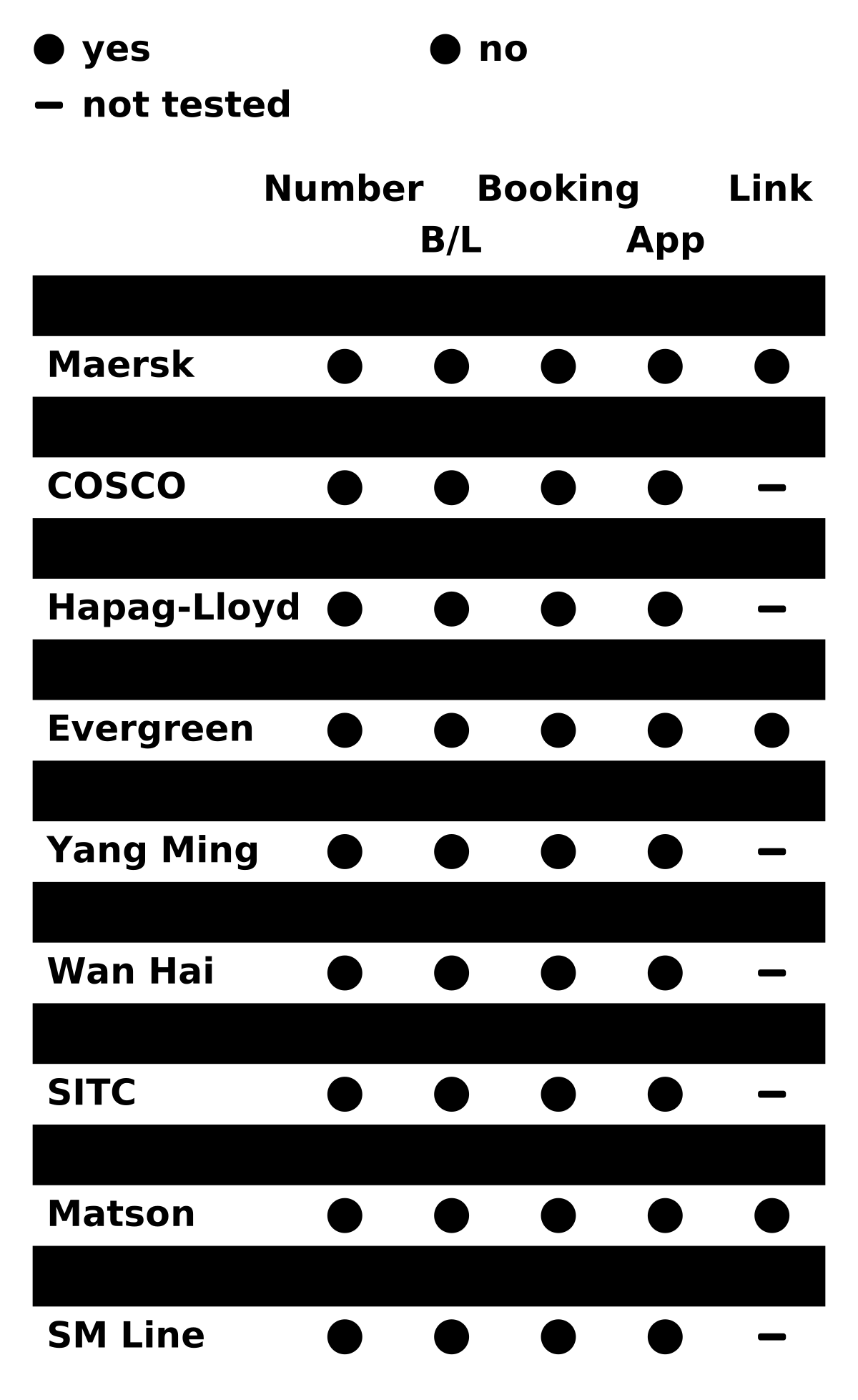
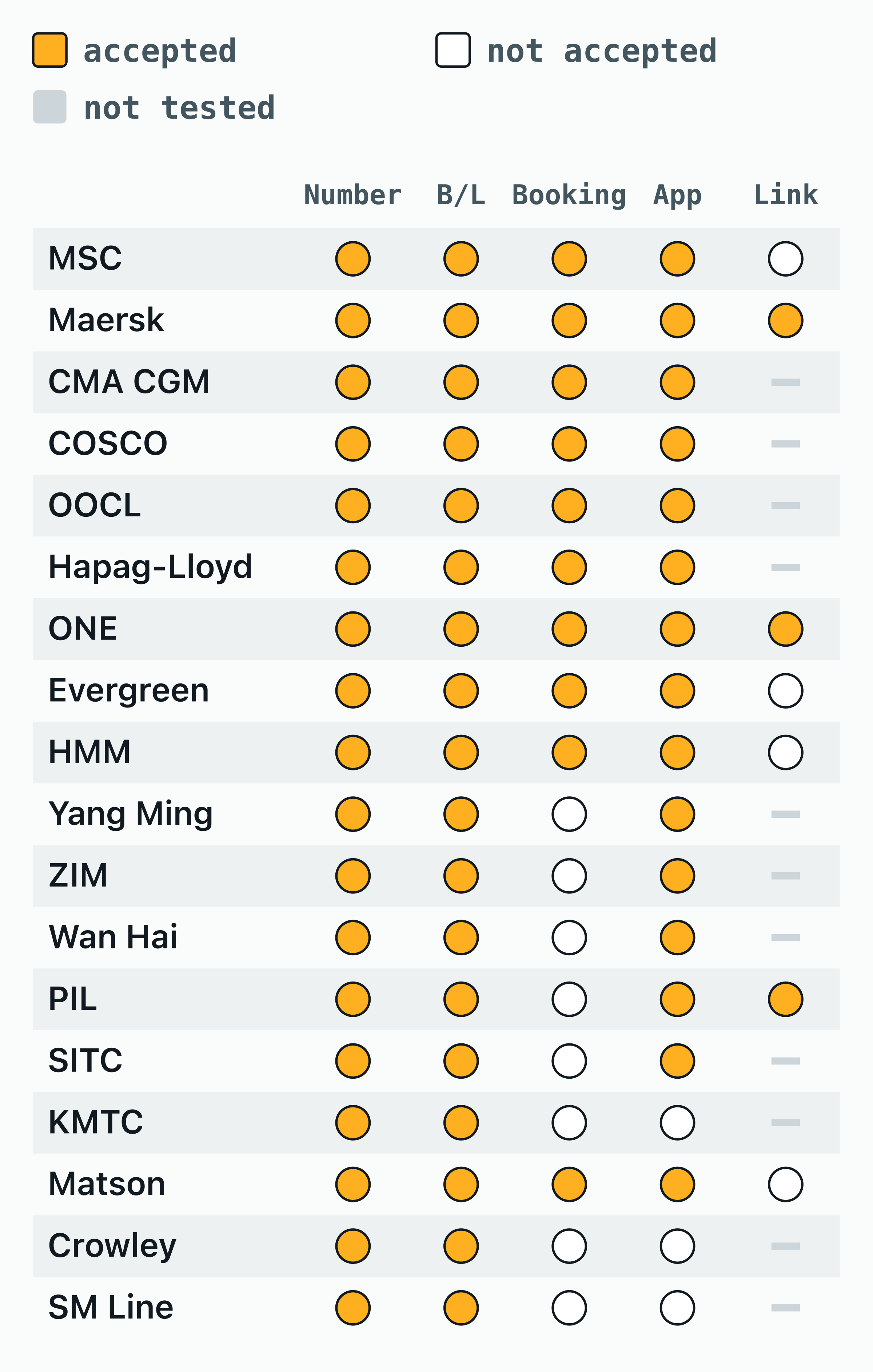
The numbers in this chart
| Carrier | Number | B/L | Booking | App | Link |
|---|---|---|---|---|---|
| MSC | ✓ | ✓ | ✓ | ✓ | — |
| Maersk | ✓ | ✓ | ✓ | ✓ | ✓ |
| CMA CGM | ✓ | ✓ | ✓ | ✓ | ? |
| COSCO | ✓ | ✓ | ✓ | ✓ | ? |
| OOCL | ✓ | ✓ | ✓ | ✓ | ? |
| Hapag-Lloyd | ✓ | ✓ | ✓ | ✓ | ? |
| ONE | ✓ | ✓ | ✓ | ✓ | ✓ |
| Evergreen | ✓ | ✓ | ✓ | ✓ | — |
| HMM | ✓ | ✓ | ✓ | ✓ | — |
| Yang Ming | ✓ | ✓ | — | ✓ | ? |
| ZIM | ✓ | ✓ | — | ✓ | ? |
| Wan Hai | ✓ | ✓ | — | ✓ | ? |
| PIL | ✓ | ✓ | — | ✓ | ✓ |
| SITC | ✓ | ✓ | — | ✓ | ? |
| KMTC | ✓ | ✓ | — | — | ? |
| Matson | ✓ | ✓ | ✓ | ✓ | — |
| Crowley | ✓ | ✓ | — | — | ? |
| SM Line | ✓ | ✓ | — | — | ? |
Frequently asked questions
Where do I find the container number?
The container number is stencilled in four places on the box itself — most prominently on the upper right of the right-hand door, and again on both sides and the roof — and it is printed on your bill of lading and booking confirmation. All of them are the same 11 characters; if the door marking is damaged or repainted, use the paperwork.
What is the format of a container number?
A container number is exactly 11 characters: four letters then seven digits, written as MSKU 307703-8. The first three letters are the owner code registered with the BIC, the fourth is the equipment category (U for a freight container, J for detachable equipment, Z for a trailer or chassis), the next six are the owner’s serial number, and the last digit is a check digit computed from the other ten under ISO 6346.
How do I track a container by container number?
Read the 11-character number from the door (e.g. MSKU 307703-8), identify the carrier from the letter prefix (MSKU = Maersk, MSCU = MSC, CMAU = CMA CGM), and enter it on that carrier’s tracking page. You get vessel, ETA and terminal moves free of charge.
How is the container check digit calculated?
Convert the first ten characters to values (digits as-is; letters A=10 to Z=38, skipping multiples of 11), multiply each by 2 to the power of its position, sum, and take the remainder mod 11 — that remainder is the check digit, with 10 written as 0. One misread character almost always breaks the match.
My container starts with TRLU or TGHU — which line is carrying it?
Those prefixes belong to leasing companies (Triton and Textainer), which own about half the world fleet. The prefix cannot tell you the carrier — any line may operate a leased box. Find the operating line on your booking confirmation or bill of lading and track on that line’s site.
Can I track someone else’s container?
Yes — carrier tracking is public by design. Anyone with the container number can see its moves, because consignees, truckers, terminals and customs all need the same data without accounts or authorisation. No cargo details are shown, only the box’s movements.
Why does container tracking show nothing?
Usually the box has left the shipping network — containers sold into storage keep their painted numbers but are no longer tracked. Otherwise: a feed that has not caught up yet, a box idle between leases, a small carrier without public tracking, or a misread number failing its check digit.
What is the difference between a container number and a B/L number?
The container number identifies the physical box for life; the bill of lading number identifies one shipment’s contract, and a booking number one reservation — either may cover several containers. Trackers accept all three, but only the container number follows a specific box.
What do the letters in a container number mean?
The first three letters are the owner’s BIC code (MSK = Maersk, MSC = MSC, CMA = CMA CGM); the fourth is the equipment category — U for all freight containers. The seven digits that follow include a final check digit that validates the whole number.
How much does it cost to track a container?
Nothing — every major carrier publishes container status free of charge, with no account. Paid tracking APIs, billed per container, exist for forwarders monitoring fleets across many lines in one dashboard; for a single container the carrier’s own page gives you the same data at no cost.
Can I track a container on my phone?
Yes — carrier tracking pages are ordinary mobile websites, and Maersk, MSC and Hapag-Lloyd also offer dedicated apps. Our checker runs in any browser: validate the number, then tap through to the line’s tracker with the number pre-filled where supported.
How do I track a TEMU, Triton or Textainer container?
You don’t track it with the leasing company — TEMU and TGHU are Textainer prefixes, TRLU/TCLU/TCKU are Triton’s, and lessors run no trackers. Find the operating line on your booking or B/L and track there. Note: boxes marked TEMU are unrelated to the Temu shopping app, whose parcels use courier tracking numbers.
Can I track a container live on a map?
While the box is on a vessel, yes — its position is the ship’s AIS position, shown on free vessel-tracking maps; the carrier’s ETA accompanies it. On land you get terminal events rather than a moving dot. Real-time GPS of the box itself exists only on premium IoT-equipped containers.
What does a size/type code like 22G1 or 45G1 mean?
It is the second line of the door marking, defined by ISO 6346: the first character is length (2 = 20 ft, 4 = 40 ft; 45 ft is L in the 1995 edition and 5 since 2022), the second is height (2 = 8 ft 6 in, 5 = 9 ft 6 in high cube), the last two are the type — G for general purpose, R for reefer, T for tank. So 45G1 is a 40 ft high cube dry container.
One page, every owner code
Know whose box it is before you search
All 85 owner prefixes mapped to their line or leasing company, with the leased ones marked — so you can tell at a glance when to track with the line instead. It comes in the container pack, with every container’s dimensions.
The bot check did not finish, so nothing was sent. Send the form again; if it stops again, allow challenges.cloudflare.com in your blocker or write to info@contsize.com from the address the file should go to.
Nothing was sent: the address could not be read, or a required box was not ticked. Check them and send the form again.